gelateria: (Default)
[personal profile] gelateria
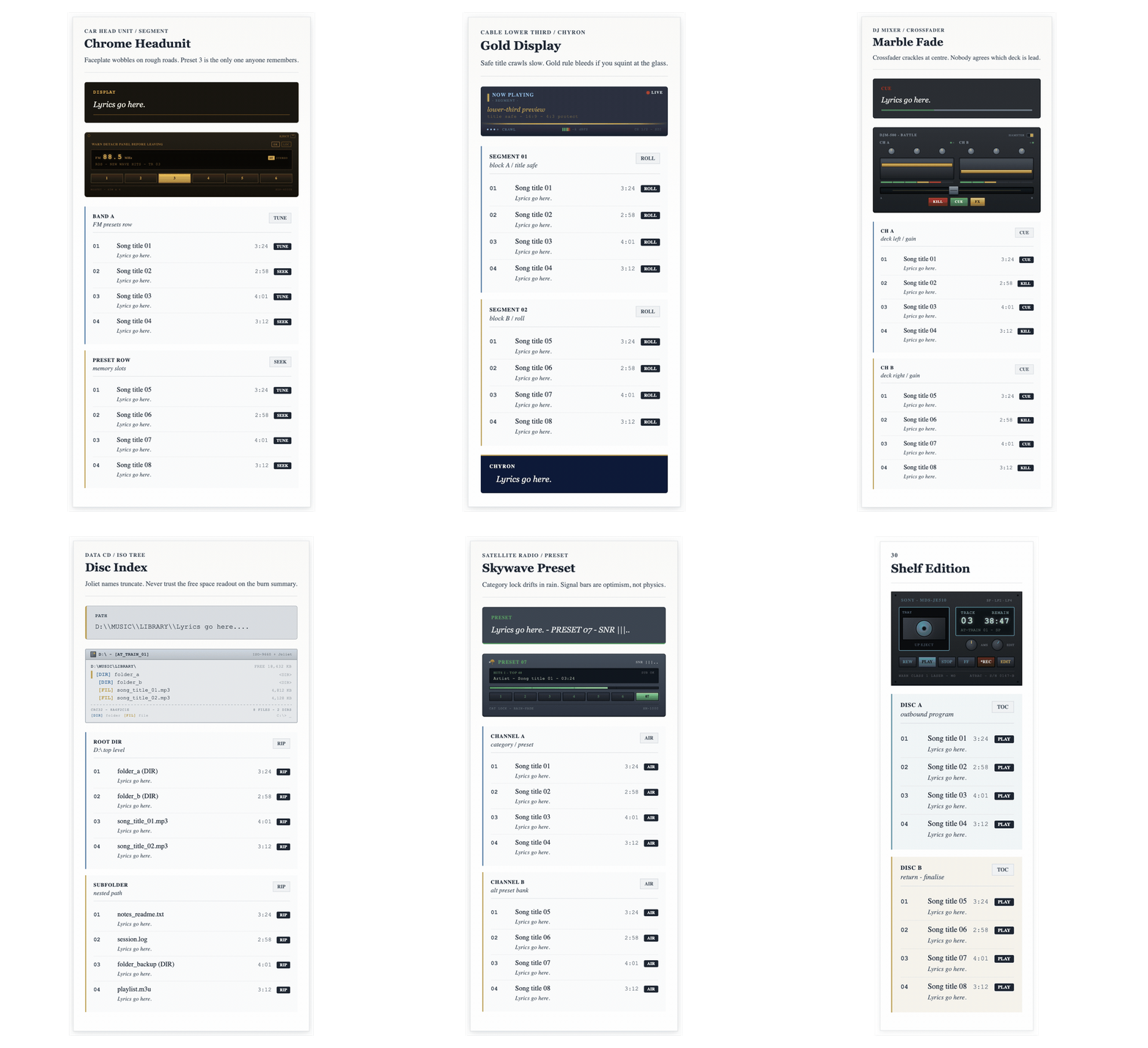
Animated preview of ten Signal Static batch 03 playlist codes

Playlist layouts - batch 03

Batch 03 leans further into panels, head units, presets and shelf systems.

There is a slightly cleaner, more indexed feel through these ten, with stronger labels and more visible display framing. Once again, the length of the post was too long, so I had to cut the last three off.  All of the missing codes will be in a code overflow post at the end when I have finished posting this series.

The live preview comes first, with the copyable HTML directly underneath each layout.

21. Chrome Headunit

DISPLAY
Lyrics go here.
 
EJECT
WARN DETACH PANEL BEFORE LEAVINGDXLOC
FM88.5MHzSTSTEREO
RDS - NEW WAVE HITS - TR 03
1 2 3 4 5 6
MOSFET - 45W x 4XDP-4000X
BAND A
FM presets row
TUNE
01
Song title 01
Lyrics go here.
3:24 TUNE
02
Song title 02
Lyrics go here.
2:58 SEEK
03
Song title 03
Lyrics go here.
4:01 TUNE
04
Song title 04
Lyrics go here.
3:12 SEEK
PRESET ROW
memory slots
SEEK
01
Song title 05
Lyrics go here.
3:24 TUNE
02
Song title 06
Lyrics go here.
2:58 SEEK
03
Song title 07
Lyrics go here.
4:01 TUNE
04
Song title 08
Lyrics go here.
3:12 SEEK

Batch 03

A dashboard-style layout with metallic trim and a direct, display-led face.

Copy the HTML below and paste it into Dreamwidth in HTML mode.

A good fit for sharper playlists with a more display-led feel.

22. Crystal Panel

PROMPT
Lyrics go here.
(next line muted)
NEXT LINEMIC 1
CUE BAR - M. 120:08 / 3:24
 
 
REW BACK GO PLAY AIR
RTA - SM58 - -14 dB(next line muted)
QUEUE 01
lead mic / screen A
AIR
01
Song title 01
Lyrics go here.
3:24 AIR
02
Song title 02
Lyrics go here.
2:58 AIR
03
Song title 03
Lyrics go here.
4:01 AIR
04
Song title 04
Lyrics go here.
3:12 AIR
QUEUE 02
harmony / screen B
AIR
01
Song title 05
Lyrics go here.
3:24 AIR
02
Song title 06
Lyrics go here.
2:58 AIR
03
Song title 07
Lyrics go here.
4:01 AIR
04
Song title 08
Lyrics go here.
3:12 AIR

Batch 03

A cleaner panel layout with lighter surfaces and strong, tidy signposting.

Copy the HTML below and paste it into Dreamwidth in HTML mode.

Keeps things tidy if you want the layout to read quickly at a glance.

23. Gold Display

LIVE
NOW PLAYING
- SEGMENT -
lower-third preview
title safe - 16:9 - 4:3 protect
 
CRAWL -6 dBFS CH 1/2 - SDI
SEGMENT 01
block A / title safe
ROLL
01
Song title 01
Lyrics go here.
3:24 ROLL
02
Song title 02
Lyrics go here.
2:58 ROLL
03
Song title 03
Lyrics go here.
4:01 ROLL
04
Song title 04
Lyrics go here.
3:12 ROLL
SEGMENT 02
block B / roll
ROLL
01
Song title 05
Lyrics go here.
3:24 ROLL
02
Song title 06
Lyrics go here.
2:58 ROLL
03
Song title 07
Lyrics go here.
4:01 ROLL
04
Song title 08
Lyrics go here.
3:12 ROLL
CHYRON
Lyrics go here.

Batch 03

A brighter interface layout with gold-toned highlights and a crisp screen feel.

Copy the HTML below and paste it into Dreamwidth in HTML mode.

Helpful when you want a brighter screen look without losing order.

24. Studio Panel

STREAM
Lyrics go here.
128 kbps - L:0042
SHOUTcast DNAS v1.9.8:: ADMIN
MOUNT
icecast.local:8000/lounge
BR128 kbps L0042 / 0250 UP03:47:12
 
CURRENT RELAY SRC MP3 - "Downtempo / Lounge"
MOUNT 01
stream source A
LOAD
01
Song title 01
Lyrics go here.
3:24 LOAD
02
Song title 02
Lyrics go here.
2:58 LOAD
03
Song title 03
Lyrics go here.
4:01 LOAD
04
Song title 04
Lyrics go here.
3:12 LOAD
MOUNT 02
relay B
LOAD
01
Song title 05
Lyrics go here.
3:24 LOAD
02
Song title 06
Lyrics go here.
2:58 LOAD
03
Song title 07
Lyrics go here.
4:01 LOAD
04
Song title 08
Lyrics go here.
3:12 LOAD

Batch 03

A studio-facing layout with firm structure and clear sectioning for denser playlists.

Copy the HTML below and paste it into Dreamwidth in HTML mode.

Best for denser playlists where clearer sectioning does more of the work.

25. Marble Fade

CUE
Lyrics go here.
 
DJM-500 - BATTLEHAMSTER
CH A


CH B


A B
KILL CUE FX
CH A
deck left / gain
CUE
01
Song title 01
Lyrics go here.
3:24 CUE
02
Song title 02
Lyrics go here.
2:58 KILL
03
Song title 03
Lyrics go here.
4:01 CUE
04
Song title 04
Lyrics go here.
3:12 KILL
CH B
deck right / gain
CUE
01
Song title 05
Lyrics go here.
3:24 CUE
02
Song title 06
Lyrics go here.
2:58 KILL
03
Song title 07
Lyrics go here.
4:01 CUE
04
Song title 08
Lyrics go here.
3:12 KILL

Batch 03

A softer display layout with blended tones and a smoother, more decorative finish.

Copy the HTML below and paste it into Dreamwidth in HTML mode.

A softer choice if you want a little more finish without going ornate.

26. Disc Index

PATH
D:\\MUSIC\\LIBRARY\\Lyrics go here....
D:\ - [AT_TRAIN_01]ISO-9660 + Joliet
D:\MUSIC\LIBRARY\FREE 18,432 KB
[DIR] folder_a<DIR>
[DIR] folder_b<DIR>
[FIL] song_title_01.mp34,812 KB
[FIL] song_title_02.mp34,128 KB
CRC32 - 8A4F2C1E 8 FILES - 2 DIRS
[DIR] folder [FIL] file C:\> _
ROOT DIR
D:\ top level
RIP
01
folder_a (DIR)
Lyrics go here.
3:24 RIP
02
folder_b (DIR)
Lyrics go here.
2:58 RIP
03
song_title_01.mp3
Lyrics go here.
4:01 RIP
04
song_title_02.mp3
Lyrics go here.
3:12 RIP
SUBFOLDER
nested path
RIP
01
notes_readme.txt
Lyrics go here.
3:24 RIP
02
session.log
Lyrics go here.
2:58 RIP
03
folder_backup (DIR)
Lyrics go here.
4:01 RIP
04
playlist.m3u
Lyrics go here.
3:12 RIP

Batch 03

A more indexed layout with catalogue-like signposting and a neat, labelled feel.

Copy the HTML below and paste it into Dreamwidth in HTML mode.

Works well when you want the layout to feel more filed and labelled.

27. Console Memory

SCENE
Lyrics go here.
SAVE DATA SRAM 8 KB
SLOT 0103B
 
SLOT 02?
 
SLOT 03-
 
SAVE BLOCK A - OVERWRITE?
OST - TR 01 - "Song title 01"
O CANCELHEX CONFIRMUP VIEW
STAGE 01
save slot A
SAVE
01
Song title 01
Lyrics go here.
3:24 SAVE
02
Song title 02
Lyrics go here.
2:58 LOAD
03
Song title 03
Lyrics go here.
4:01 SAVE
04
Song title 04
Lyrics go here.
3:12 LOAD
STAGE 02
save slot B
SAVE
01
Song title 05
Lyrics go here.
3:24 SAVE
02
Song title 06
Lyrics go here.
2:58 LOAD
03
Song title 07
Lyrics go here.
4:01 SAVE
04
Song title 08
Lyrics go here.
3:12 LOAD

Batch 03

A console-style layout with strong blocks and a more archival, saved-state look.

Copy the HTML below and paste it into Dreamwidth in HTML mode.

A useful option if you want something more blocky and archive-adjacent.


This account has disabled anonymous posting.
If you don't have an account you can create one now.
HTML doesn't work in the subject.
More info about formatting